Configuring primary HySecure Cluster Manager
After the first security officer user is registered and certificate is installed on administers machine, login as security officer using the HySecure client and open the management console.
Follow these steps on HySecure management console to configure the Primary HySecure Node HySecure Cluster Installation & Configuration Guide
- Create a new HTTP type application with name "ClusterManagement" with Application Server as the virtual IP address and port as 3636. Provide the URL as http://hysecure_virtual_IP_address:3636
Note: a. replace hysecure_virtual_IP_address with the virtual IP address of the cluster provided during installation.b.This application can be marked hidden in case admin do not want to publish this on their Launchpad.
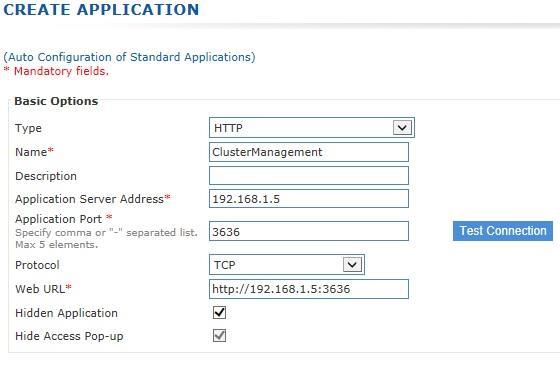
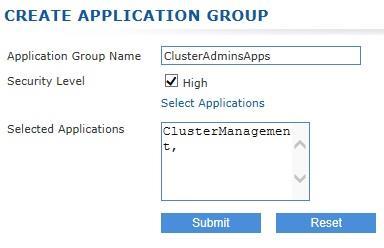
- Create an application group with name "ClusterAdminApps" with high security user and add the application to this application group
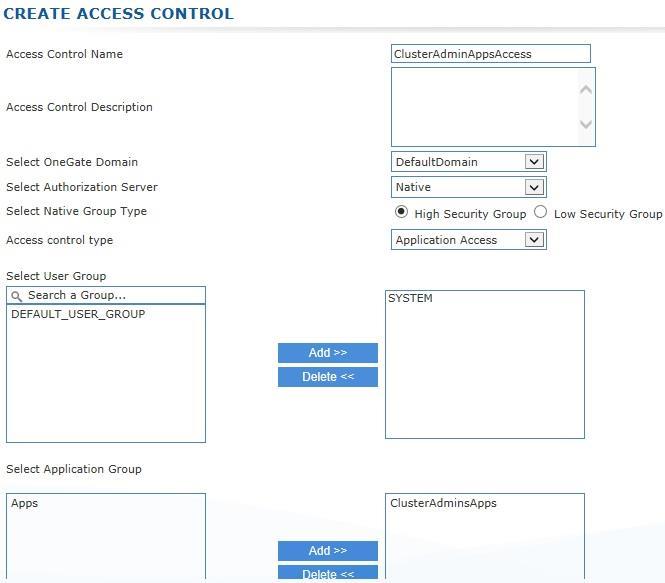
- Create an Access control using Native as the authentication server for High Security Users for the SYSTEM group and assign the newly created high security application group
- Logout from HySecure client and login again and open HySecure management console.
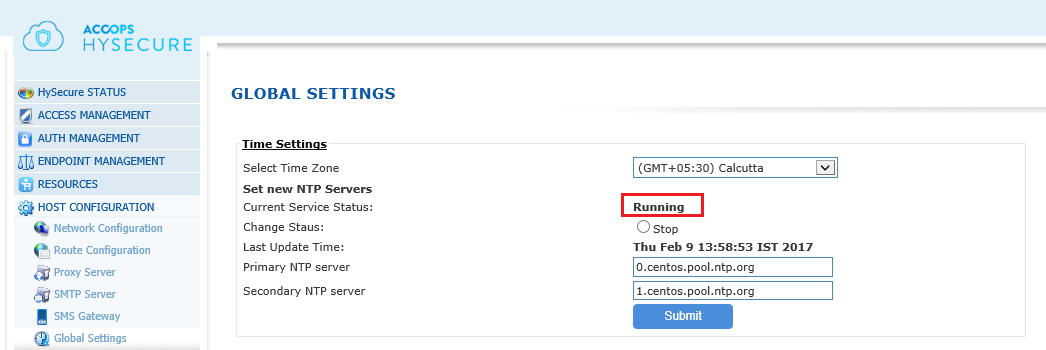
- Go to Host Configuration | Global Settings page and start NTP server.
- Go to High Availability | Configuration page and start configuring HA.
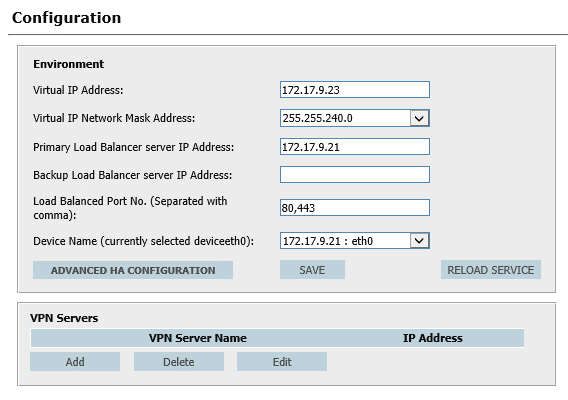
| SETTING | DESCRIPTION | DEFAULT VALUE | VALUE | SPECIFICATIONS |
|---|---|---|---|---|
| VIRTUAL IP ADDRESS | Virtual IP Address of the cluster specified during installation of first node by admin | Virtual IP Address provided | Valid IP Address | |
| VIRTUAL IP NETWORK MAST ADDRESS | Network mask of the Virtual IP Address | Please select from drop down | Valid Netmask | |
| PRIMARY LOAD | The physical IP Address of the The IP Address of this host Valid IP Address BALANCER primary Cluster Manager | |||
| SERVER IP ADDRESS | ||||
| BACKUP LOAD BALANCER SERVER IP ADDRESS | The physical IP Address of the secondary Cluster Manager | The value is blank. | It must be entered once the secondary cluster manager is added to the cluster | Valid IP Address or blank |
| LOAD BALANCED PORT NO | List of ports which will be load balanced by the service | 80 and 443 | Comma separated list of ports | |
| DEVICE NAME | The network interface name of the interface on which Virtual IP Address will be assigned. Important: Make sure to keep the same device name across all cluster manager nodes. | First interface of the host | Select from dropdown |
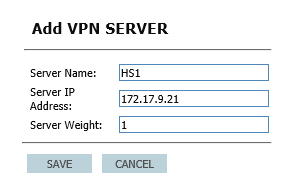
- Add the same host as the VPN Servers by clicking on Add button under VPN Servers section Specify the Server Name for display, IP Address of this host as Server IP Address. Server Weight is used for weight based load balancing when two or more VPN servers (HySecure gateways) will have different hardware sizing. The node with higher weight will receive more connections.
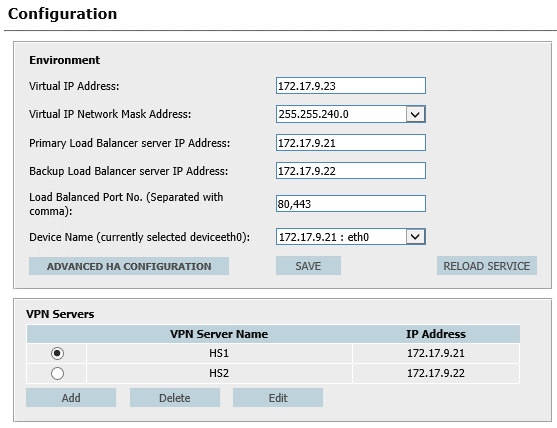
- If a secondary HySecure Cluster Manager is to be added to the cluster, the physical IP address of the secondary Cluster Manager host must be updated.
- The secondary HySecure host (if going to be added immediately) must be added as VPN Server list also.
- The final configuration shall look like this:
- Click on "ADVANCED HA CONFIGURATION" and make sure following options are checkeda. Enable check box for "Monitor NIC links for failures" b. Change the Persistence (Seconds) to 5 seconds/User preference c. Click on save button to close advanced configuration screen.
- Click on "Save" to save the configuration
- Click on "Reload Service" to apply the Cluster modified configuration to cluster
- Clicking on "Advanced HA Configuration" will show advanced cluster configurations. Follow the section at the end of this document for details on the advanced configuration.
- The Cluster configuration is completed.
- Perform other tasks like installing license and or publishing applications, ACLs, etc
- Move the gateway to "run state" if the secondary HySecure node is not to be configured as the immediate next step.