Assign mobile tokens
In version 5016, users can open HySecure user portal and login. If HyID two factor authentication is enabled for the user, user can see the option to register the mobile app token. For registration of mobile token, email or SMS based OTP is also required.
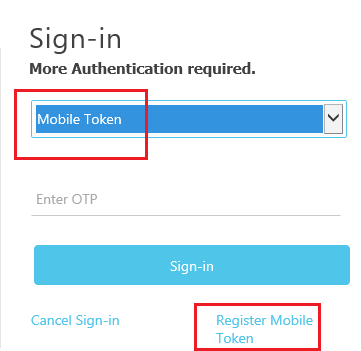
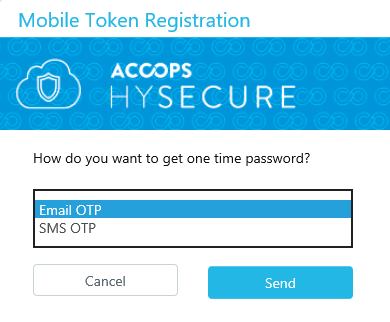
Now mobile token registration window will pop up. Select Mobile or Email OTP to get OTP and click on send button.
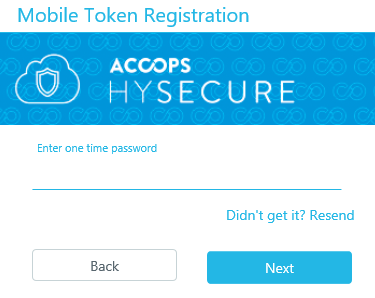
Scan this QR code using Accops HyID app. If QR code is not working, then click on CAN'T SCAN IT? link to get registration key for manual registration.

Configuring HyID Mobile Tokens
Starting from HySecure version 5057, user can download HyID mobile application from google app play or iOS apps store. Using this HyID app user need to scan QR code or manually enter registration number. Once token is configured then user can verify the token using this portal also.
New options have been added in HyID configuration option in this release. When user select mobile token check box, mobile token configuration option automatically will be visible. Here there are two configurable links. One is "Show mobile token registration link" and another is "Enable mobile token reactivation". If administrator want to hide mobile token registration or reactivation link, just uncheck the check box and save the setting.
There is another option called "No of device registrations allowed for mobile token". Here administrator can specify the number of HyID token registered devices per user. So that same user can register HyID token from how many mobile devices. By default, one user can register HyID mobile token from only one mobile device.

Registering Hyid Mobile Tokens
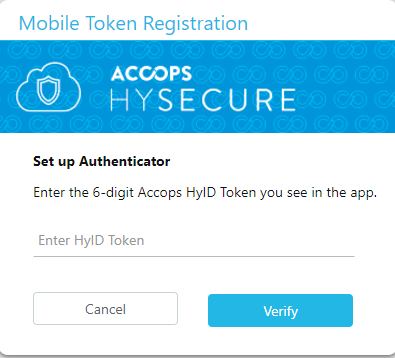
HyID mobile token registration process has been changed in this release. Now after HyID token configuration on end user mobile devices user need to set up authenticator the token number for completed the mobile token registration. After this process, mobile token can be used for login. Without token set up authenticator, mobile token registration process can't be completed.
Reactivating HyID Mobile Tokens
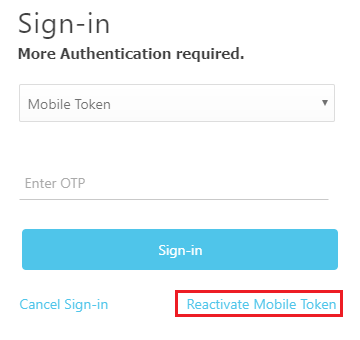
When user select mobile token on web portal user will get option for reactivating the mobile token. If a user wants to reactivate mobile token, then user need to click on this link "Reactivate mobile token" and get select OTP token type to get OTP.
Then scan this QR code using Accops HyID app. If QR code is not working, then click on CAN'T SCAN IT? link to get registration key for manual registration. Now HyID is configured on user mobile device.
Enter HyID mobile token number on set up authenticator window for completed the mobile token reactivation process. Once it is set up successfully, now it is ready for use.