Enhancements
Updated HyLite Portal
The HyLite Portal has been upgraded with a modernized UI to enhance user experience and accessibility. The new design features a cleaner layout with improved fonts, colors, and button styling for better readability. The client download section is now more organized, with updated icons and separate download links for Windows, Mac, and Linux clients for Accops.
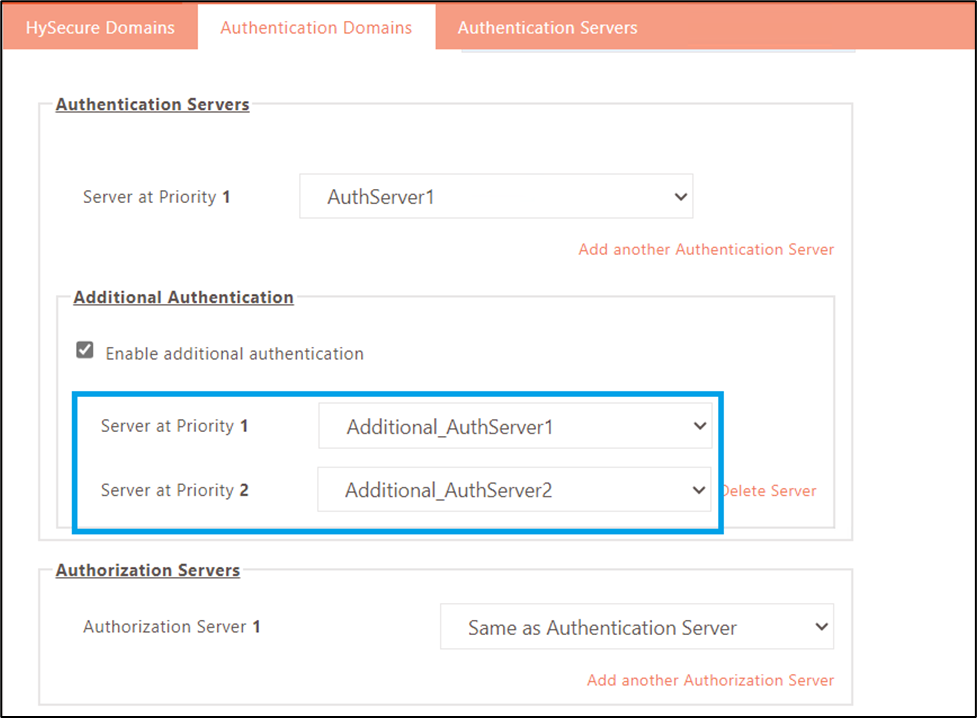
Failover Support for Additional Authentication Servers
This release introduces failover support for multiple authentication servers, allowing the configuration of up to two additional servers. If the authentication server with priority 1 becomes unreachable or fails, the authentication request will be managed by the next available server in the HySecure Gateway, according to the set priority.
Single Sign-On Support for MFA-Based Login
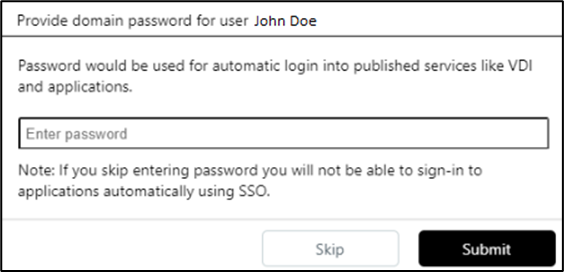
In earlier versions, single sign-on (SSO) was unavailable only for users who logged in using Multi-Factor Authentication (MFA). With this version release, SSO functionality has been added. After logging in with MFA only, users will be prompted to enter a password. This password will enable single sign-on access to their assigned applications.
How to configure
To enable this feature, follow the steps listed below:
-
Log in to the HySecure Management Console as a Security officer or Administrator.
-
Navigate to Policies > Client Profiles.
-
Select the relevant client profiles to edit.
-
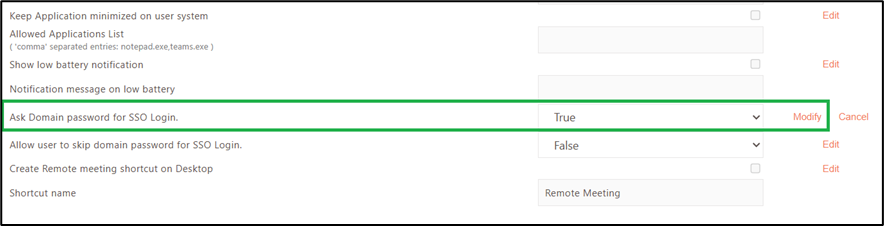
In the Advanced Configuration section, set the option Ask Domain password for SSO Login to True.
-
Once the client profile configurations are saved, users will be prompted to enter their passwords after logging in with MFA.
Streamlined Single Sign-On: New Option to Skip Credential Entry
In previous versions, users were required to enter their domain credentials each time during the single sign-on (SSO) process to access their assigned applications. With the latest update, we’ve introduced an option that allows users to skip entering their credentials, streamlining the login process while maintaining access to the applications.
By default, users will not see the option to skip the credentials.
How to configure
To enable this feature, follow the steps listed below:
-
Log in to the HySecure Management Console as a Security officer or Administrator.
-
Navigate to Policies > Client Profiles.
-
Select the relevant client profiles to edit.
-
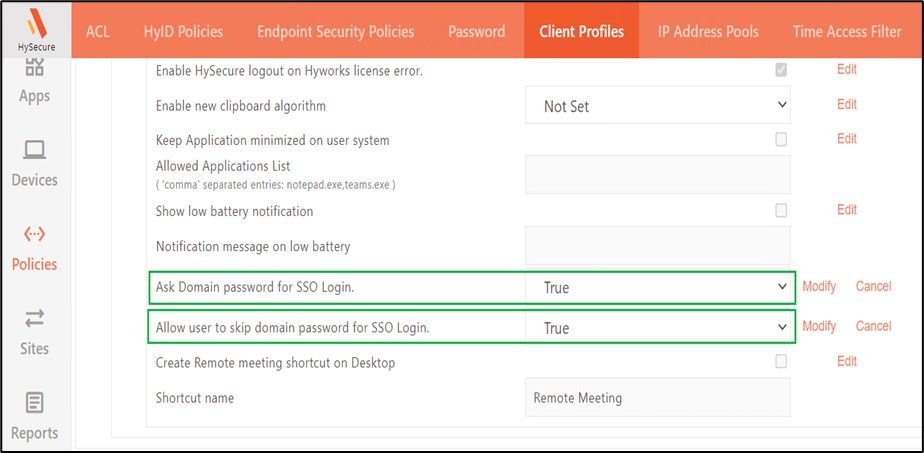
In the Advanced Configuration section, set the option Ask Domain password for SSO Login to True.
-
Also set the option Allow user to skip domain password for SSO Login to True.
Note
This option will only be visible if the Ask domain password for SSO Login setting is enabled.
-
Click SAVE CONFIGURATIONS.
-
Once the client profile configurations are saved, users will be prompted to enter their passwords and have the option to skip domain credentials after logging in with MFA.
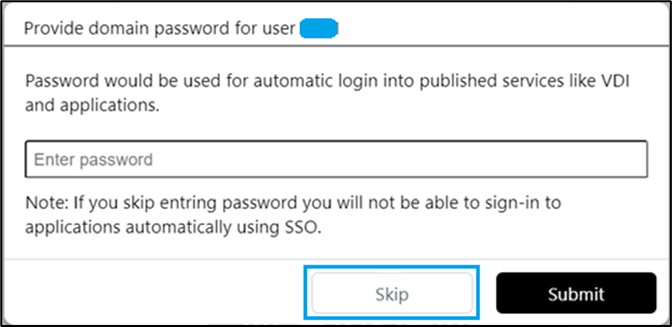
Note
The option to skip domain credentials for Passwordless or MFA-based SSO is available only for Windows clients and the HyLite Portal. It is not supported on Linux or macOS.
System Default Users’ License Limit Increased
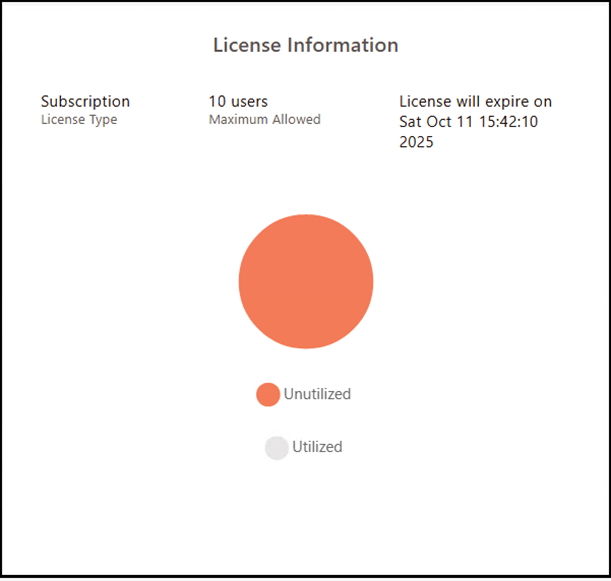
In the previous versions, the default license allowed five (5) users to access the service for 30 days. With the latest update, the default license allows 10 users for the same 30-day period.
This update also ensures that the licensing policies for the HyWorks and HySecure platforms are aligned. Hence, users of both platforms will have a more consistent experience, as the licensing rules are the same.
The default license has been expanded to allow more users (10 instead of 5) while standardizing the licensing across the platforms.
The maximum number of allowed users can be checked under the License Information section of the HySecure Management Console Dashboard.
Event IDs for Admin Logs Sent to Syslog Server
In this release, specific event IDs for HySecure admin logs have been added, and they are now sent to the Syslog server for specific events.
The details of these events, along with their respective event IDs, are listed below:
| Sr. No. | Log Messages Sent to the Syslog Server | Event ID |
|---|---|---|
| 1 | Local User Creation | 101 |
| 2 | Enabling/disabling User must change password at the next logon option for Local User | 102 |
| 3 | Modification of Password expiry date for Local Users | 103 |
| 4 | Enabling/Disabling Local User Account | 104 |
| 5 | Enabling/disabling Password never expires for Local User | 105 |
| 6 | Local User Deletion | 106 |
| 7 | Local User passphrase reset | 107 |
| 8 | Change the password for the Local User | 108 |
| 9 | Syslog settings Enabled | 109 |
| 10 | Syslog settings Disabled | 110 |
Log Structure: Username, Date, EventID, Client IP Address, WAN IP Address, MAC Address, Message, Source Node
Sample Admin Log: e.g. SO-user,05-Nov-2024 11:55:40,109, 172.25.X.XXX, 172.25.Y.XXY,00:15:5D:00:01:63,Syslog settings is Enabled,accops.hysecure_node1
Updated Geolocation Policy Database
In this release, the Geolocation policy database has been updated to correct country-level information for a few networks. This enhancement improves the geolocation-based host scan policy in HySecure, which controls login access based on the user's location.
Mobile Token Registration: Push Notification Server Offline
Until the previous release, users could only register their mobile token when the push notification server was accessible to the HyID client. However, with the current release, users can register mobile tokens even if the push notification server is unreachable.
In this case, the token will be registered as a soft token and cannot be used to receive push notifications on mobile devices. This feature is particularly beneficial for situations where the HyID Windows client is utilized for login approval or rejection, coupled with mobile token verification.
Added Authentication Device Risk Explanation
In earlier releases, only the risk level of Authentication Devices was displayed in the device details. With this release, we have included explanations behind each risk level to help administrators better understand the risks and take appropriate actions.
Below are the descriptions for each risk level:
-
Normal: This indicates the Authentication Device ID and WAN IP address have remained consistent during recent logins, suggesting a low risk of unauthorized access.
-
Medium Risk: This suggests that two or three combinations of the Authentication Device ID and WAN IP address have been used in recent logins. In this case, administrators should closely monitor the device for any potential security concerns.
-
High Risk: This indicates that more than three combinations of the Authentication Device ID and WAN IP address have been detected in recent logins. Immediate review and action are necessary to address potential security vulnerabilities and prevent unauthorized access.
HyID Logs: Client IP Inclusion for Consent Decisions
In this release, we have incorporated the HyID client IP address into the HyID logs whenever a user approves or rejects a login attempt from any Windows, Android, or iOS HyID clients. The device's IP address will be recorded in the HyID log generated during the login approval or rejection.
Added Pagination in HyID Policy
This release has implemented pagination on the HyID page to improve the user experience. This enhancement provides quicker loading of the HyID page, especially when managing many policies.
Improved Reliability for User Login with New Monitoring System
This release resolves an issue where the service responsible for user login and app access could become unresponsive while handling HySecure requests. A new monitoring system regularly checks its health to swiftly identify and address the problem, improving reliability and reducing downtime.
Enhanced Passwordless Login: Mobile Token Registration Now Available in Workspace Client
In this release, users can register for passwordless login directly through the Windows and Mac Workspace client when logging in with the passwordless option. This functionality was previously available only via the HyLite portal during passwordless login.
New Antivirus support added on HySecure Gateway
This release introduces support for new antivirus programs on the gateway, improving the admin user experience while making endpoint security policies from the gateway’s management console. Below are the new Antivirus added to the gateway management console.
- Bitdefender Antivirus
- Trend Micro Apex One Security Agent
- McAfee
- CrowdStrike Falcon Sensor
- Kaspersky Anti-Virus
- Kaspersky Internet Security
- Kaspersky Small Office Security
- Kaspersky Endpoint Security
- Sophos Home
- Sophos Intercept X
- Avira Security
- Avast Antivirus
- TotalAV
- WithSecure Elements Agent
- BitDefender Endpoint Security Tools Antimalware
PWA Support.
In this release, we have added support for Progressive Web Application (PWA) with the HyLite Portal. PWA is supported by Chromium-based browsers, Android (Firefox, Chrome, Edge, Opera, and Samsung Internet browser), iOS 16.4(Safari, Chrome, Edge, Firefox, and Orion), and iOS 16.3 earlier, but only Safari is supported.
Except for a valid SSL certificate, no extra configuration is needed for PWA.
Improved Organization of Access Device Details in the Management Console
In this release, we have restructured the Access Device details tab in the Device section of the management console and categorized the information accordingly. Instead of the previous flat list, the information is now organized into various categories for quick and easy comprehension.