External Authentication
HySecure offers support for device approval through a Mobile Device Management (MDM) server. This feature enables devices to be automatically approved to log in to the HySecure Gateway via an external server, such as VMware MDM, Scale Fusion MDM, and Microsoft Intune MDM.
The login process is based on the device's status on the MDM server. For successful login, the device must be registered on the MDM server.
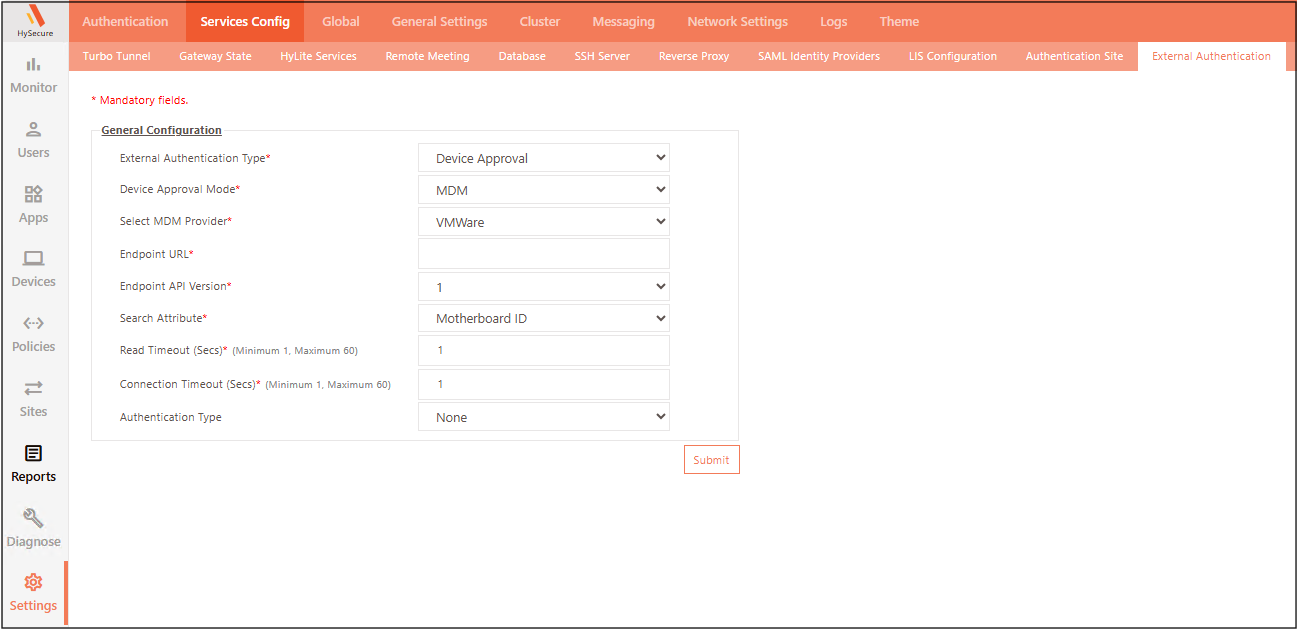
To configure External Authentication:
-
Log on to the Management Console.
-
Navigate to Settings > Services Config > External Authentication.
-
Under General Configuration, provide the following information (* indicates a required field), then click Submit.
| Field | Description |
|---|---|
| External Authentication Type | Choose Device Approval. Manual device approval is governed by the Device ID policy, which uses the motherboard serial number as the device parameter supplied by the MDM provider. |
| Device Approval Mode* | Choose MDM as the approval mode. |
| Select MDM Provider* | Choose the MDM provider — VMware, Scalefusion, or Microsoft Intune. |
| Endpoint URL* | Specify the API endpoint URL of the selected MDM provider's server. HySecure uses this URL to communicate with the MDM server to verify device registration status. |
| Endpoint API Version* | Choose the API version of the MDM provider (e.g., VMware) to be used for the connection. |
| Search Attribute* | Specifies the attribute used to identify and search for the device on the MDM server. Select Motherboard ID, Device ID, or Entra Device ID. |
| Read Timeout (Secs)*(Minimum 1, Maximum 60) | Defines the period within which data must be received over an established connection with the external MDM server. |
| Connection Timeout (Secs)*(Minimum 1, Maximum 60) | Defines the time within which a connection between HySecure and the external MDM server must be established. If this time is exceeded, HySecure displays a connection timeout message. |
| Authentication Type | Choose the authentication type used to connect to the MDM server. Select None to connect without authentication, or Basic to authenticate using the MDM Client ID, Client Secret, and Endpoint API Key. |