Auto Backup
User and System backups can be generated automatically and mailed or uploaded to an FTP location.
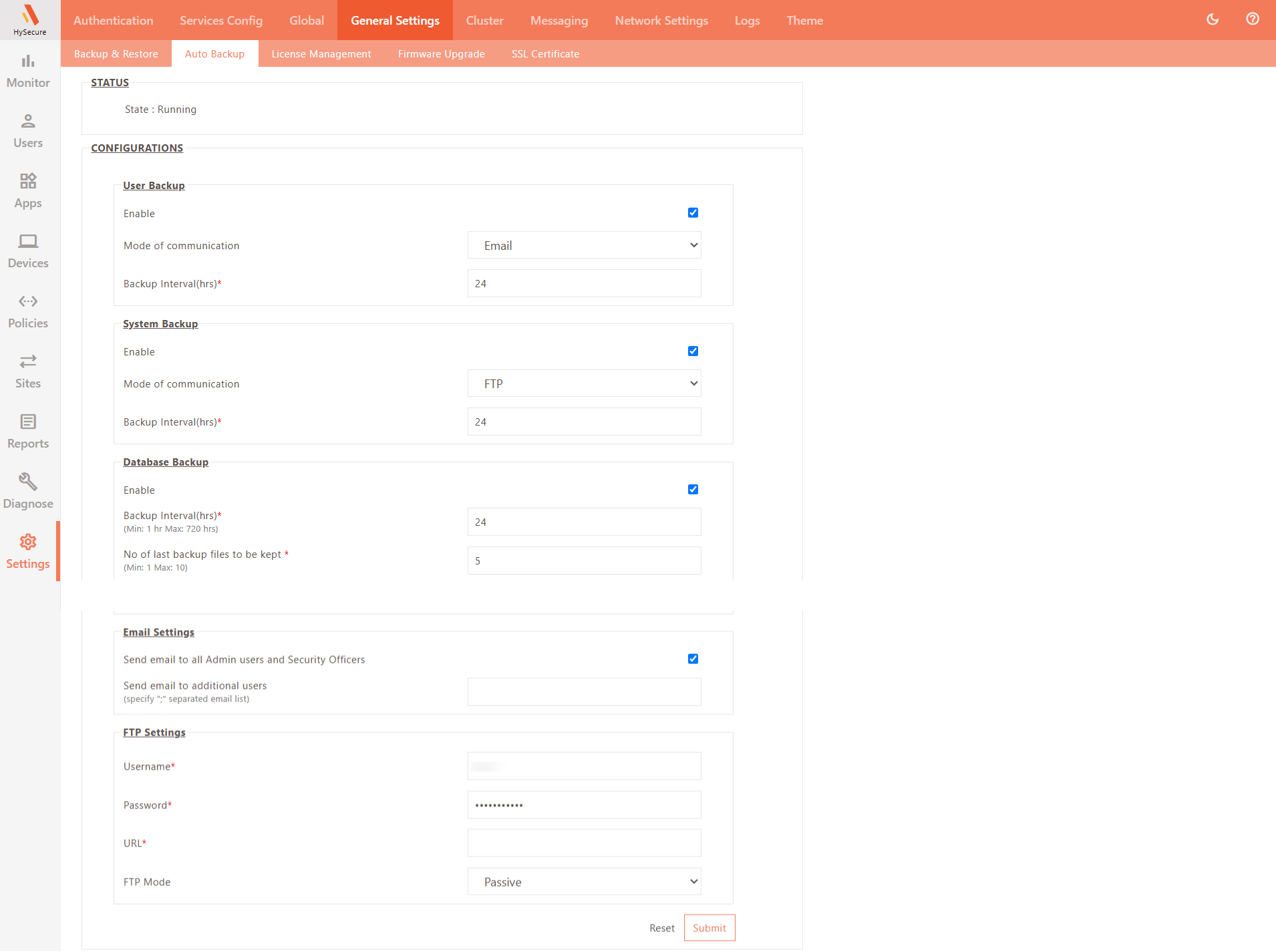
To check the state of the auto-backup module and configure automatic backup:
-
Log on to the Management Console.
-
Navigate to Settings > General Settings > Auto Backup.
-
STATUS indicates the auto-backup module’s current status. It could be running or stopped. Change the status by clicking Start or Stop. An auto backup will not be initiated if the module is stopped.
-
Configure User Backup settings. This enables auto-backup of User Settings Only.
Field Description Enable Check this option to enable automatic backups of User Settings. Mode of communication Select the backup sharing method, either FTP or Email. Backup Interval (hrs) Enter the interval at which the backup is to be taken and sent as per the configuration. -
Configure entire system backup settings.
Field Description Enable Check this option to automatically backup the entire System. Mode of communication Select the backup sharing mode as either FTP or Email. Backup Interval (hrs) Enter the interval in hours at which the backup needs to be taken and sent as per the configuration. -
Database Backup: The HySecure administrator must ensure that backups are taken regularly; in the absence of a backup, an untoward failure will result in a complete reconfiguration of the gateway. To avoid such situations, database backups are enabled by default, with the last 10 backups retained, and are taken every 24 hours. Click to enable this automatic database backup. Depending on the requirements, change the backup interval and the number of last backup files to be preserved.
-
Email Settings: Set up email addresses to send backup files. The backup file can be mailed to all registered administrators and Security Officers on HySecure, or to specific email IDs.
Field Description Send email to all Admin users and Security Officers Check this option if the backup needs to be sent via email to all administrators and Security Officers configured in HySecure. Send email to additional users
(specify ";" separated email list)Enter ";" separated list of email IDs to whom the auto backup needs to be sent. -
FTP Settings: The configuration backup can also be sent to an FTP site.
Field Description Username Enter the username to be used to connect to the FTP server. Password Password for the username to be used to connect to the FTP server. URL FTP server URL to connect to for uploading the backup file. FTP Mode By default this is set to Passive and cannot be editable. -
Click Submit to save the configuration.