Antivirus Database
Antivirus Detection Rules Upload via Management Console
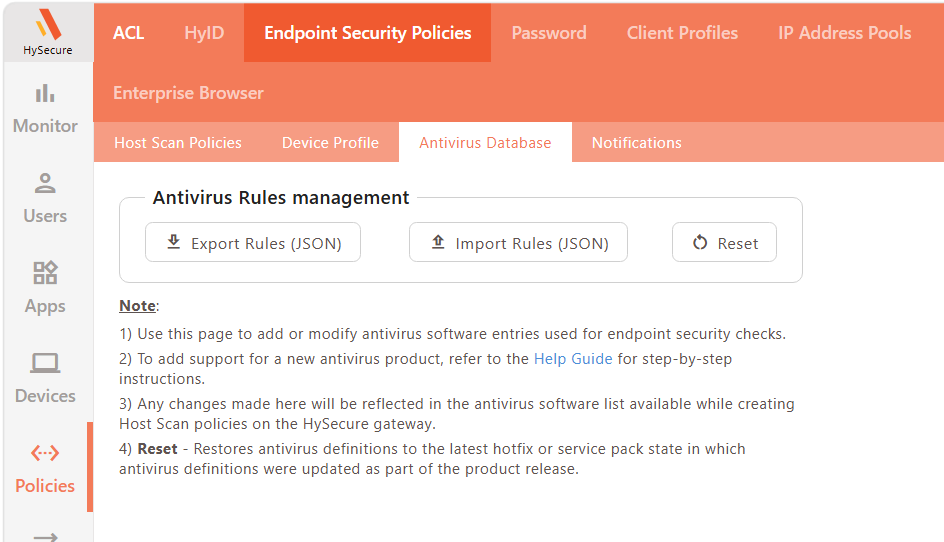
Antivirus Database Management enables administrators to manage the antivirus detection rules on the HySecure Gateway directly from the Management Console. These detection rules are used to define antivirus-based host scan policies for endpoint security. The rules can be exported as a JavaScript Object Notation (JSON) file, modified locally, and re-imported through the console.
Key capabilities
-
JSON export: Downloads the current antivirus detection rules as a JSON file.
-
JSON import: Uploads a modified JSON file to update the antivirus detection rules.
Configuration
-
Log in to the HySecure Management Console as Security Officer or Administrator.
-
Navigate to Policies > Endpoint Security Policies > Antivirus Databases.
-
Click Export Rules (JSON) to download the current antivirus detection rules.
-
Modify the downloaded JSON file to add or update antivirus entries.
-
Click Import Rules (JSON) and upload the modified file.
-
Confirm that the added or updated entries are visible in host scan policies.