RabbitMQ Installation
RabbitMQ is used in HyWorks by several modules to send, receive, and manage messages to support multiple features, enabling various features, some of which are outlined below:
-
DVM Push: Desktop agents will push session events and heartbeats while the VM Scale Booster (Consumer service) updates the database, thereby reducing overhead on the HyWorks Controller.
-
HA Notify: The HyWorks Controller sends updates on the current high-availability status, including the active primary server, enabling modules to connect to the appropriate server.
-
Scheduler Action and Notification: The Scheduler and Action Processor components use message queues to perform scheduled actions and then send notifications to agents in sessions.
Note
The exact version of RabbitMQ is required for the installation.
RabbitMQ Installation Steps:
-
Copy the setup file of the downloaded compatible version of the RabbitMQ server.
-
Log in to the server using user credentials that have local administrator privileges.
-
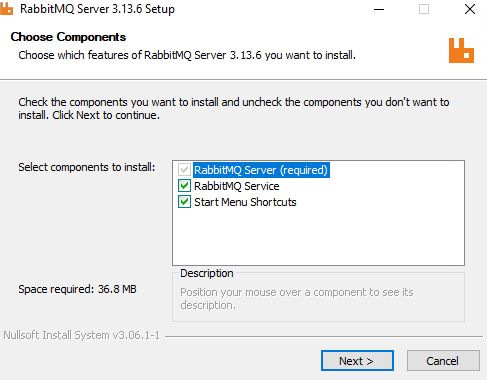
Double-click the rabbitmq-server-x.xx.x.exe (where x.xx.x is the version; the .exe name may differ) and proceed with installation.
-
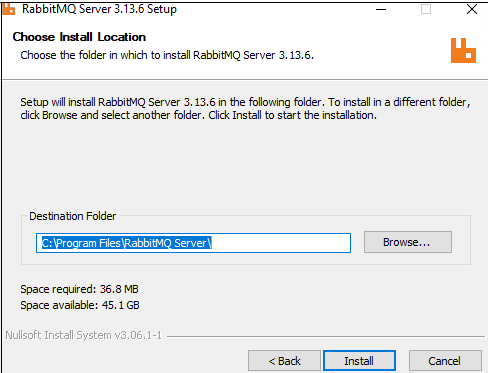
Select the install location folder and click Next.
-
Once the installation is complete, confirm that the RabbitMQ service is installed properly and running.
-
At this point, RabbitMQ, with its prerequisite Erlang OTP, will be ready.
-
The next step is to configure the RabbitMQ service to enable it for other Accops modules such as VM Scale Booster, Scheduler, or Action Processor.
-
Basic Configuration: To configure the basic RabbitMQ server, follow the RabbitMQ Server Configuration steps.
-
Advanced Configuration: To perform advanced configurations, such as enabling SSL, changing the default port, upgrading, and enabling high availability, refer to the RabbitMQ Advanced Configurations section.
-