High Availability (HA) Guide
This guide provides detailed steps for adding multiple nodes to OpenSearch and Logstash to set up a High Availability (HA) configuration for the Accops Reporting Server (ARS).
Important
- Before proceeding, ensure you have an existing ARS instance that is fully installed and configured with OpenSearch, Logstash, and Opensearch-Dashboards.
- Take a snapshot of the ARS instance before proceeding.
To convert your ARS server into a 5-node HA cluster, a minimum of four additional nodes are required:
-
Node 1: Master Node
-
Node 2: Master Node
-
Node 3: Master Node
-
Node 4: Data Node
-
Node 5: Data Node
Installation
-
Create 5 VMs with OpenSearch and ARS installed. Assign unique IP addresses to each.
-
Change Hostname on each node. Open the file vi /etc/hostname and change the hostname of ARS. Save that file.
Node 1

Node 2

Node 3

Node 4

Node 5

-
Update the Hosts file. Open vi /etc/hosts and edit the file on each node to map the respective IP addresses to hostnames. For every server in the cluster.
Node 1

Node 2

Node 3

Node 4

Node 5

-
Stop all the services on every Node.
-
Stop and disable Opensearch-dashboard.
-
systemctl stop opensearch-dashboards
-
systemctl disable opensearch-dashboards
-
-
Kill logstash
-
ps -ax | grep logstash
-
kill -9 Logstash_PID
-
-
Stop Opensearch
- systemctl stop opensearch
-
Clean Node Data
-
cd /var/lib/opensearch/
-
rm -rf nodes/
-
-
Generate Certificate
- Generate Certificates for OpenSearch on a Master Node. To generate a certificate, create a Directory named HACERT.
mkdir /etc/opensearch/HACERT
cd /etc/opensearch/HACERT
Note
Organization name and Organization unit (OU) must be different in node certificate than root and admin certificate.
Example:
(root and admin certificate) emailAddress=admin@accops.com,CN=*.ACCOPS.COM,OU=it,O=ACOOPS,L=PUNE,ST=MH,C=IN
(node certificate) emailAddress=@accops.com,CN=.ACCOPS.COM,OU=iy,O=ACCOPS,L=PUNE,ST=MH,C=IN
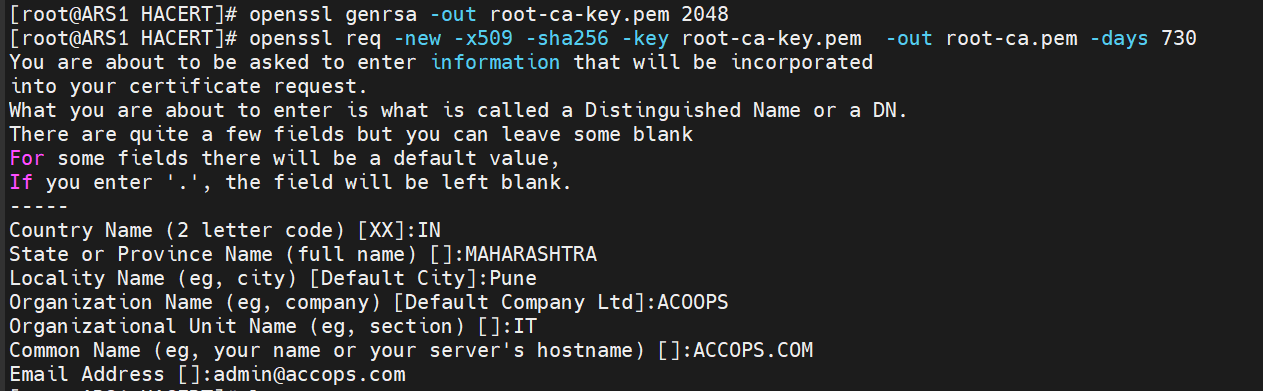
For RootCA Certificate
openssl genrsa -out root-ca-key.pem 2048
openssl req -new -x509 -sha256 -key root-ca-key.pem -out root-ca.pem -days 730
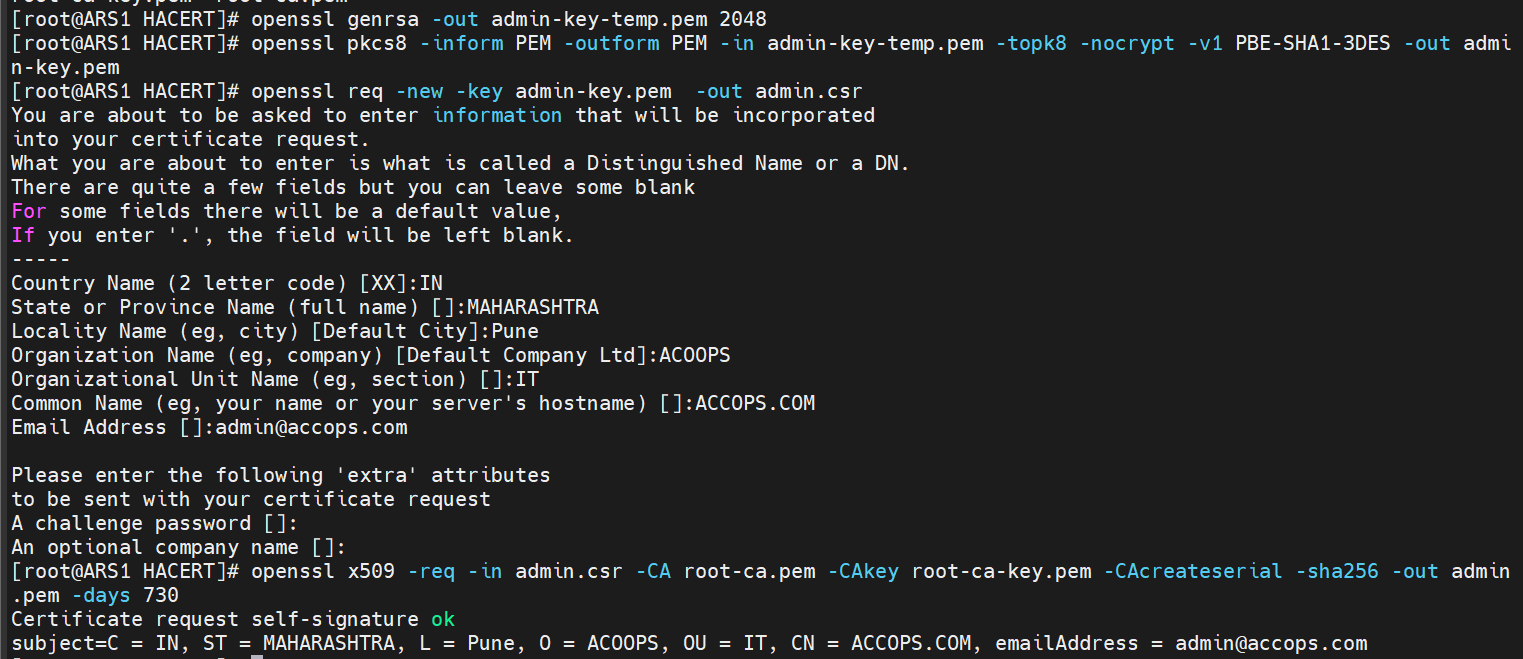
For Admin Certificates
openssl genrsa -out admin-key-temp.pem 2048
openssl pkcs8 -inform PEM -outform PEM -in admin-key-temp.pem -topk8 -nocrypt -v1 PBE-SHA1-3DES -out admin-key.pem
openssl req -new -key admin-key.pem -out admin.csr
openssl x509 -req -in admin.csr -CA root-ca.pem -CAkey root-ca-key.pem -CAcreateserial - sha256 -out admin.pem -days 730
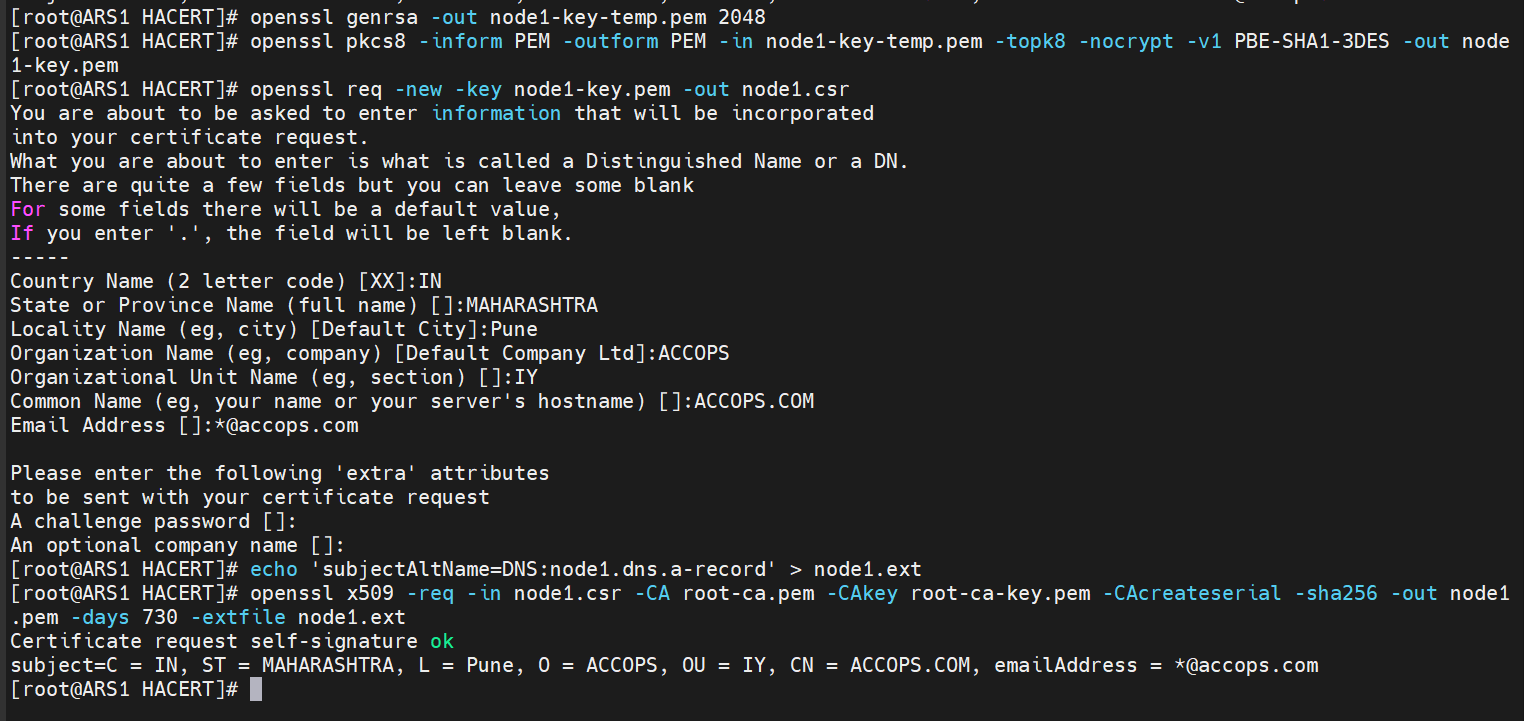
For Node Certificates
openssl genrsa -out node1-key-temp.pem 2048
openssl pkcs8 -inform PEM -outform PEM -in node1-key-temp.pem -topk8 -nocrypt -v1 PBE-SHA1-3DES -out node1-key.pem
openssl req -new -key node1-key.pem -out node1.csr
echo 'subjectAltName=DNS:node1.dns.a-record' > node1.ext
openssl x509 -req -in node1.csr -CA root-ca.pem -CAkey root-ca-key.pem -CAcreateserial -sha256 -out node1.pem -days 730 -extfile node1.ext
- Copy the created HACERT folder to the remaining 4 nodes (machines).
Configure OpenSearch on each Node
Perform the following steps on every node:
-
Edit the file vi /etc/opensearch/opensearch.yml
-
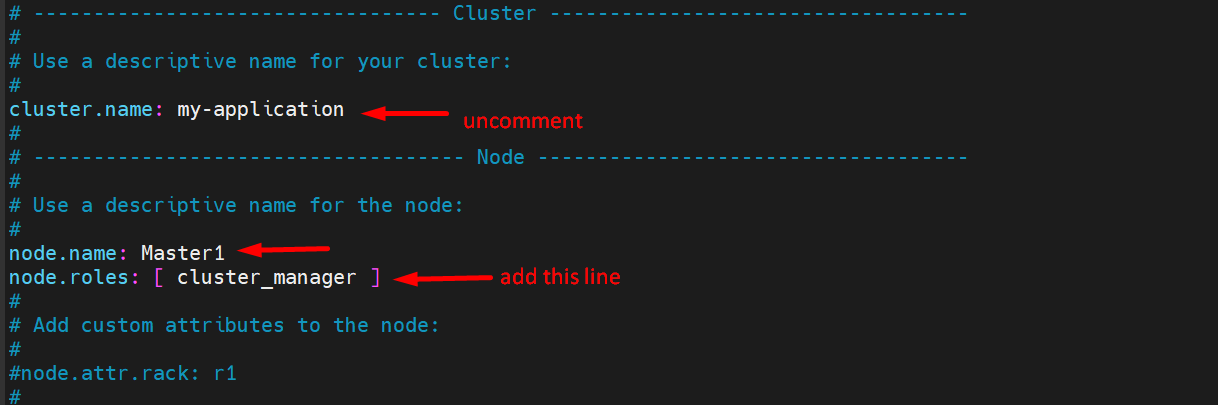
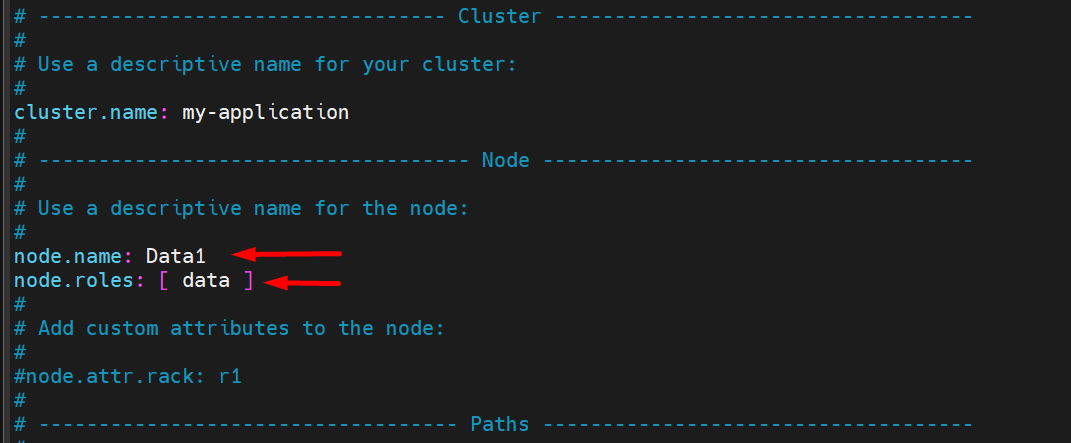
Uncomment Line: cluster.name: my-application
-
Uncomment node.name and add node name according to the Master and data node, eg,:
node.name: Master1
node.name: Master2
node.name: Master3
node.name: Data1
node.name: Data2
-
Add line : node.roles as:
-
For Every Master Nodes > node.roles: [ cluster_manager ]
-
For Every Data Nodes > node.roles: [ data ]
-
-
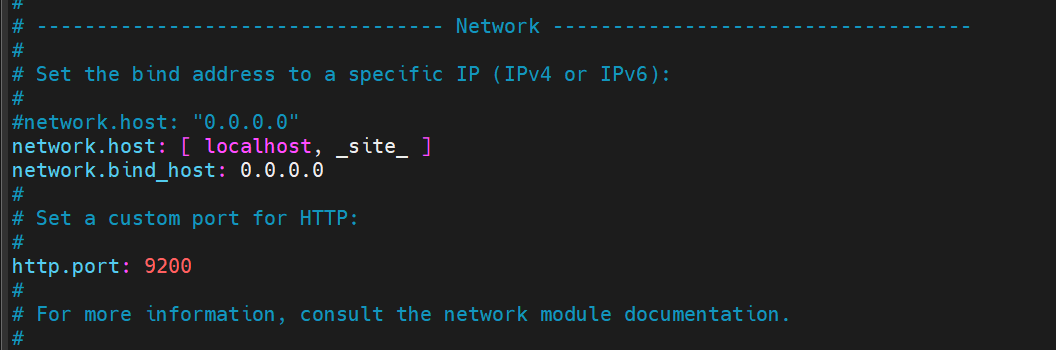
Comment the Line > network.host: "0.0.0.0”
-
Add Lines > network.host: [ localhost, _site] and network.bind_host: 0.0.0.0
-
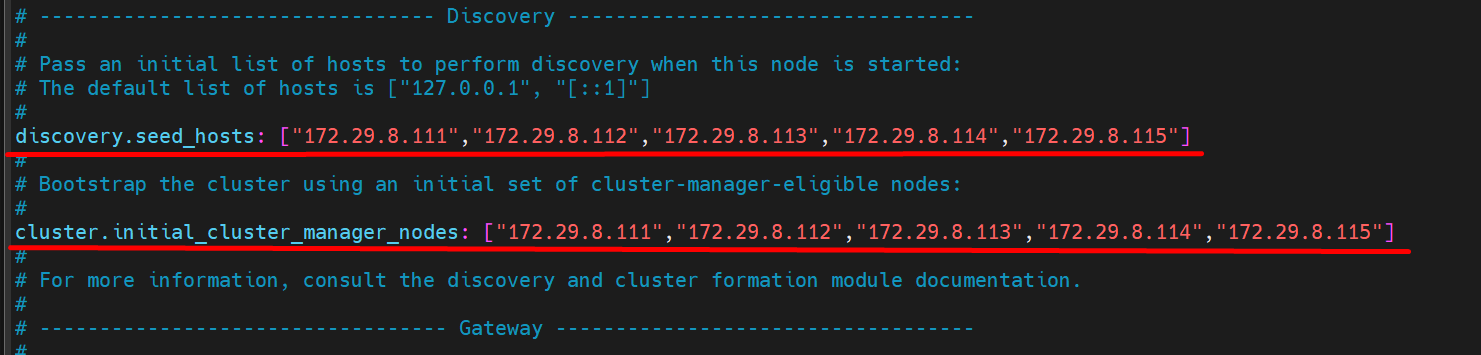
Add IPs of all nodes.
-
Add the following lines at the end of the opensearch.yml file.
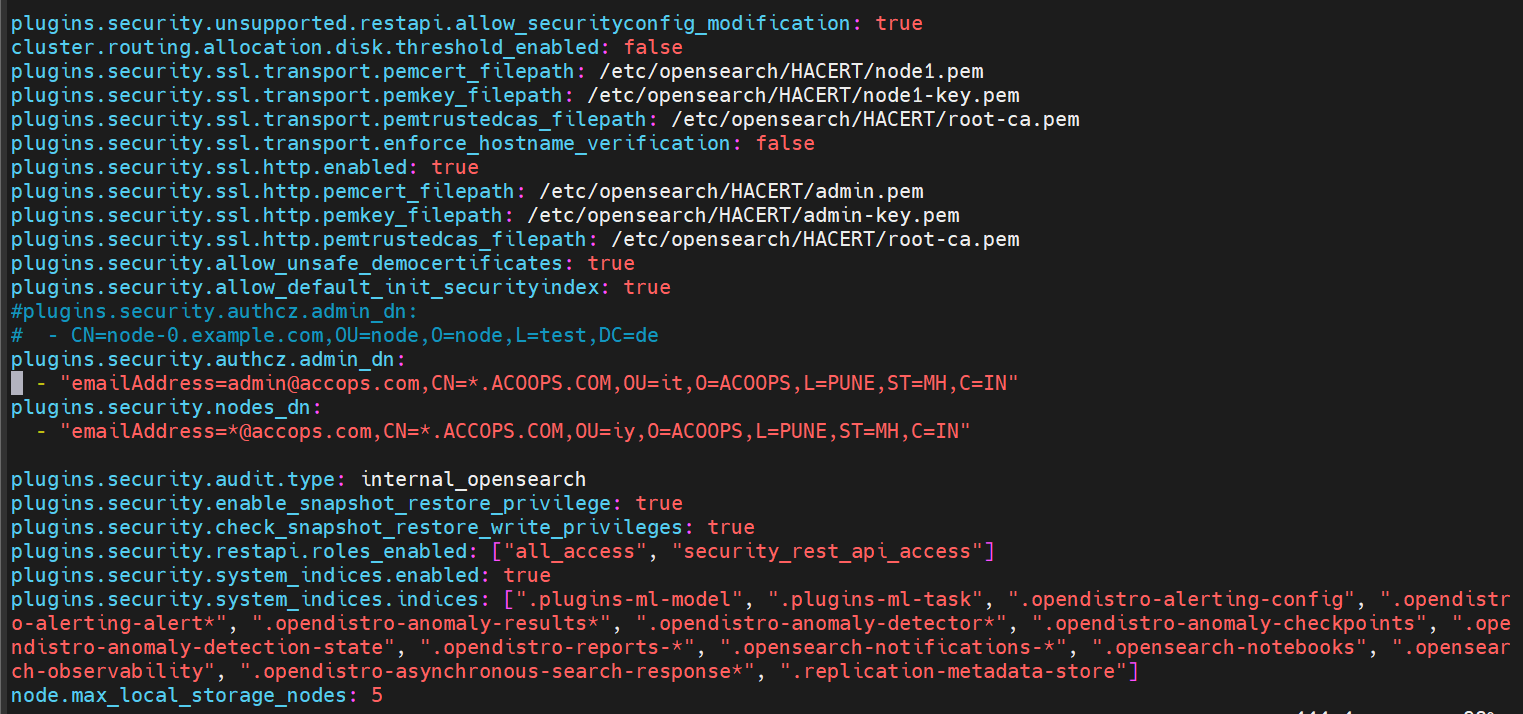
plugins.security.unsupported.restapi.allow_securityconfig_modification: true
cluster.routing.allocation.disk.threshold_enabled: false
plugins.security.ssl.transport.pemcert_filepath: /etc/opensearch/HACERT/node1.pem
plugins.security.ssl.transport.pemkey_filepath: /etc/opensearch/HACERT/node1-key.pem
plugins.security.ssl.transport.pemtrustedcas_filepath: /etc/opensearch/HACERT/root-ca.pem
plugins.security.ssl.transport.enforce_hostname_verification: false
plugins.security.ssl.http.enabled: true
plugins.security.ssl.http.pemcert_filepath: /etc/opensearch/HACERT/admin.pem
plugins.security.ssl.http.pemkey_filepath: /etc/opensearch/HACERT/admin-key.pem
plugins.security.ssl.http.pemtrustedcas_filepath: /etc/opensearch/HACERT/root-ca.pem
plugins.security.allow_unsafe_democertificates: true
plugins.security.allow_default_init_securityindex: true
plugins.security.authcz.admin_dn:
CN=node-0.example.com,OU=node,O=node,L=test,DC=de plugins.security.authcz.admin_dn:
-"emailAddress=admin@accops.com,CN=.ACCOPS.COM,OU=it,O=ACOOPS,L=PUNE,ST=MH,C=IN" plugins.security.nodes_dn: - "emailAddress=@accops.com,CN=*.ACCOPS.COM,OU=iy,O=ACOOPS,L=PUNE,ST=MH,C=IN"
plugins.security.audit.type: internal_opensearch
plugins.security.enable_snapshot_restore_privilege: true
plugins.security.check_snapshot_restore_write_privileges: true
plugins.security.restapi.roles_enabled: ["all_access", "security_rest_api_access"]
plugins.security.system_indices.enabled: true
plugins.security.system_indices.indices: [".plugins-ml-model", ".plugins-ml-task", ".opendistro-alerting-config", ".opendistro-alerting-alert", ".opendistro-anomaly-results", ".opendistro-anomaly-detector", ".opendistro-anomaly-checkpoints", ".opendistro-anomaly-detection-state", ".opendistro-reports-", ".opensearch-notifications-", ".opensearch-notebooks", ".opensearch-observability", ".opendistro-asynchronous-search-response", ".replication-metadata-store"]
node.max_local_storage_nodes: 5
-
Start Opensearch and Opensearch-dashboard on all three machine
systemctl start opensearch
systemctl start opensearch-dashboards
-
Stop Firewall
systemctl stop firewalld
-
Run the following command on only one master node:
Note
Run these commands only if JAVA_HOME is not set for OpenSearch.
JAVA_HOME=/usr/share/opensearch/jdk/
OPENSEARCH_JAVA_HOME=/usr/share/opensearch/jdk/
ln -s /usr/share/opensearch/jdk/bin/java /usr/bin/java
-
Navigate to the following directory:
cd /usr/share/opensearch/plugins/opensearch-security/tools/
sudo sh securityadmin.sh -cd /etc/opensearch/opensearch-security/ -icl -nhnv -cacert /etc/opensearch/HACERT/root-ca.pem -cert /etc/opensearch/HACERT/admin.pem -key /etc/opensearch/HACERT/admin-key.pem
-
Check health and nodes for HA setup
curl -XGET 'https://localhost:9200/_cat/health?v' -u admin:accopsars -k
curl -XGET 'https://localhost:9200/_cat/nodes?v' -u admin:accopsars -k