Optional Configurations
Installation of Accops User Experience Monitor (AUEM) - DVM
Accops User Experience Monitor (AUEM) is a tool that collects detailed data from shared desktop servers. It tracks per-user, per-session metrics such as CPU and memory usage, network activity, and disk I/O. AUEM also reports on login times, including the latency for each step from entering credentials to accessing the desktop.
This tool is especially useful for troubleshooting slow desktop access issues and is included in the Log Shippers zip folder.
Follow the steps listed below to configure the RTT/DVM on the Controller, AUEM/DVM, and Registry Settings.
Prerequisites
-
SHD RDP access with admin privileges.
-
Controller Access with ADMIN privileges.
-
Controller Version: 3.4 SP2 LR1 HF1.1
-
HyWorks DVM Tools: v3.4.0.820
-
Windows Session Host Server: v3.4.0.18146
Steps to install the package on the required shared desktop servers:
-
Log in to the SHD server using Admin privileges.
-
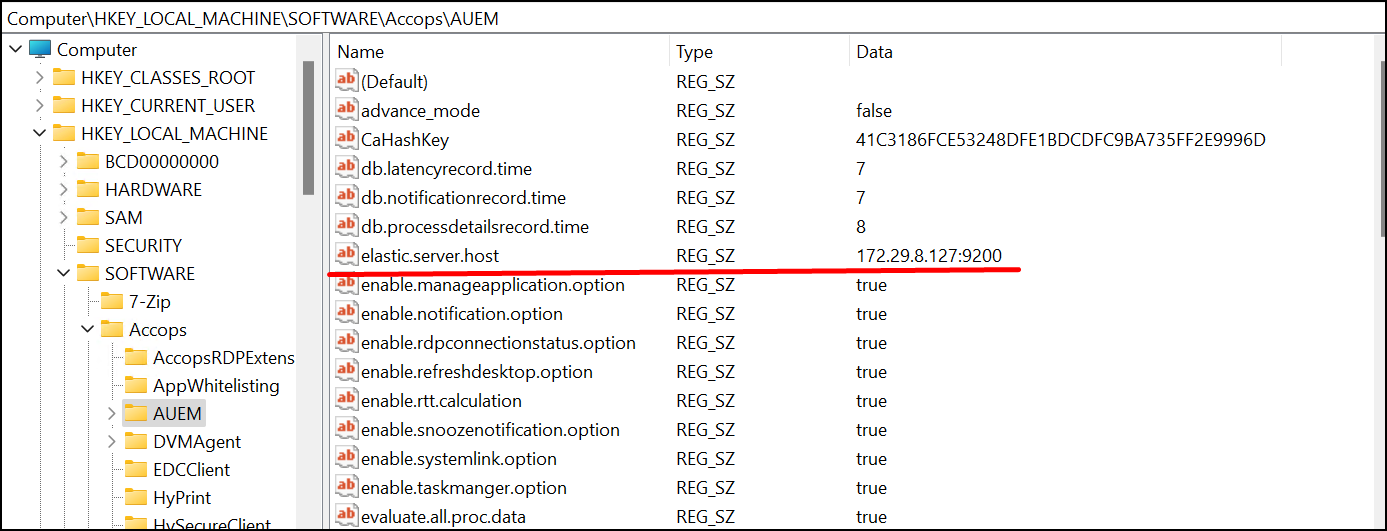
Open Registry and navigate to the registry path: HKEY_LOCAL_MACHINE\SOFTWARE\Accops\AUEM
a. Set the monitor.winlogon as true.
b. Set the monitor to true.
c. Update the timer as per the requirement rtt.interval.seconds (default-10).
d. Set the enable.rtt.calculation as true.
e. Set the evaluate.all.proc.data as true.
f. Set the evaluate.notification.data as false.
g. Set the elastic.server.host as ARS_IP:9200.
-
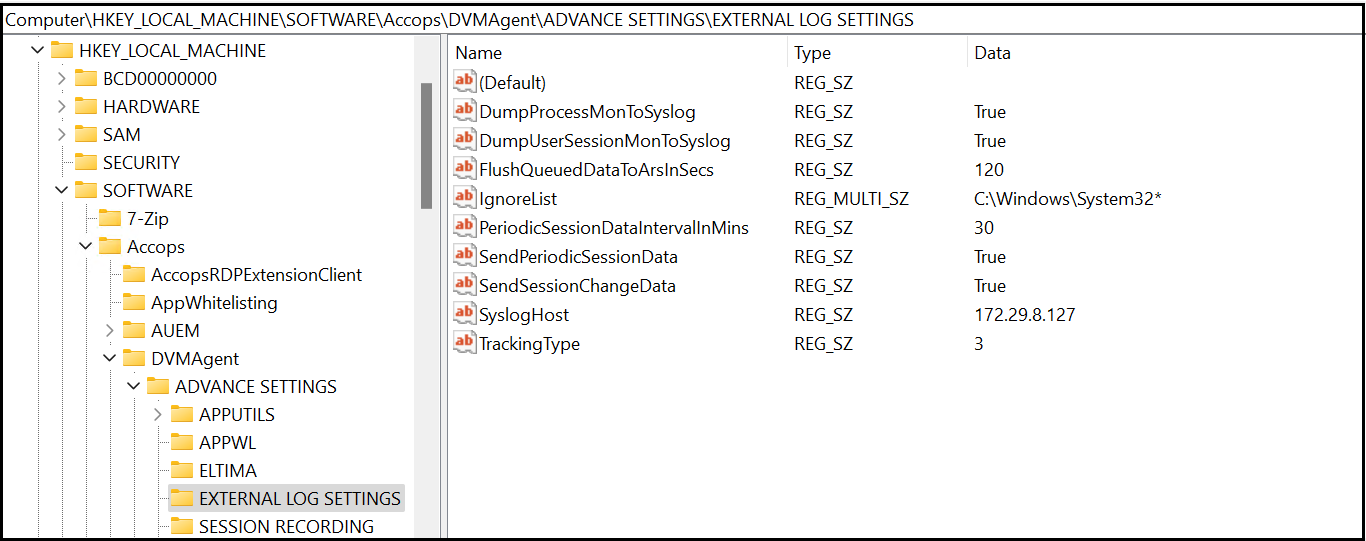
Navigate to the Registry path: HKEY_LOCAL_MACHINE\SOFTWARE\Accops\DVMAgent\ADVANCE SETTINGS\EXTERNAL LOG SETTINGS
a. Set the DumpUserSessionMonToSyslog flag to true.
b. Set the DumpProcessMonToSyslog flag to true.
c. Add ARS_IP in SyslogHost.
d. Set the TrackingType type to 3.
-
Navigate to the path: C:\Program Files (x86)\Accops\AUEM
-
Open ServiceUtility.exe
-
Enter the username as Admin and the password as Admin@123 (Default).
-
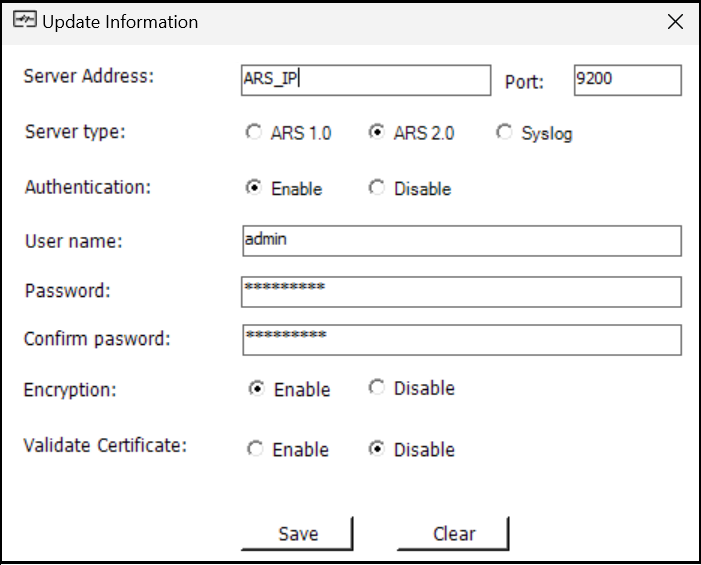
Next, configure the ARS server details and save the file.
a. ARS IP and Port 9200
b. Select from the server types listed below:
-
ARS 1.0: If the ARS version is ARS 1.8 (ELK Stack)
-
ARS 2.0: If the ARS version is ARS 2.0 (OpenSearch Stack)
-
Syslog: If syslog server
c. Enable Authentication.
d. Enter Username and Password of ARS server.
e. Enable Encryption.
f. Disable Validate Certificate.
g. Now save the configuration and close the ServiceUtility.exe.
Note
Once you save this configuration, in the future, the ServiceUtility.exe username and password will be the same as ARS Authentication.
-
-
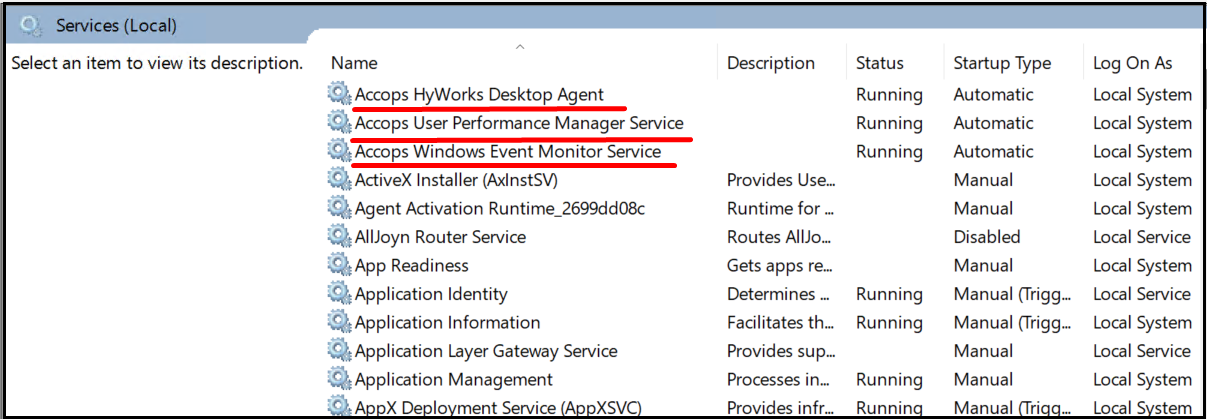
Restart the following services:
a. Accops HyWorks Desktop Agent
b. Accops User Performance Manager Service
c. Accops Windows Event Monitor Service
Note
Use the Latest Client version v.3.4.0.449 to test the configuration.