Cluster Restart
Disabling Maintenance Mode in Active Config Node
-
Connect to the HySecure Active Config Node as a Security Officer.
Note
Do not connect using a Virtual IP Address; use the actual IP address of the Active Config node.
-
Log in as a security officer.
-
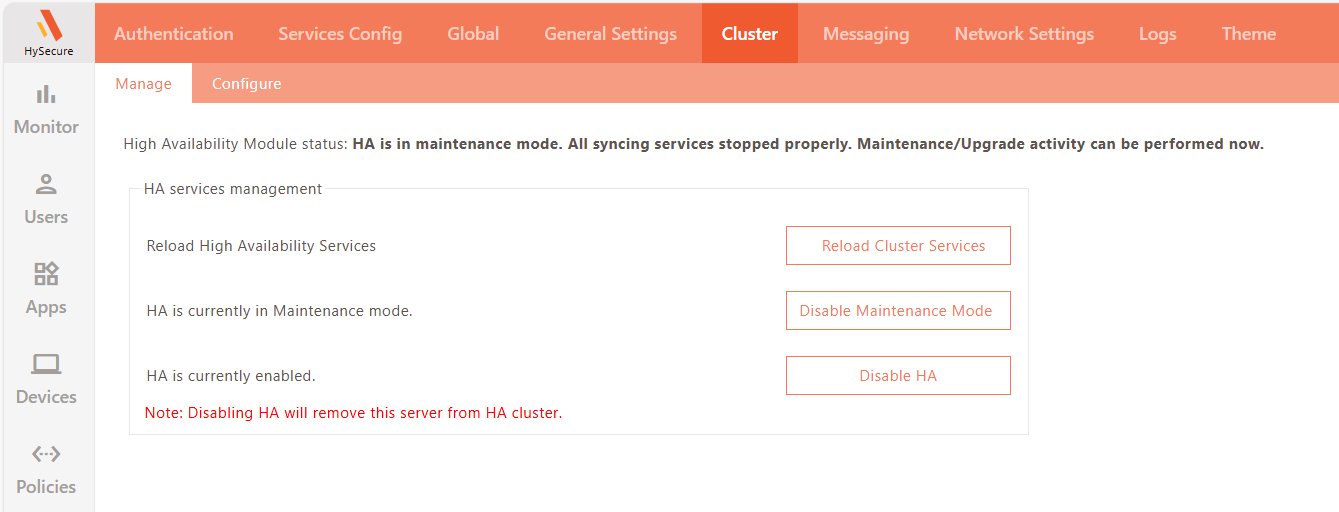
Now go to Settings > Cluster > Manage and click Disable Maintenance Mode.
Disabling Maintenance Mode in Standby Config Node
-
Connect to the HySecure Standby Config Node as a Security Officer.
Note
Do not connect using a Virtual IP Address; use the actual IP address of the Standby Config node.
-
Log in as a security officer.
-
Now go to Settings > Cluster > Manage and click Disable Maintenance Mode.
Disabling Maintenance Mode in Access Server Node
-
Connect to the HySecure Access Server Node as a Security Officer.
Note
Do not connect using a Virtual IP Address; use the actual IP address of the Access Server node.
-
Log in as a security officer.
-
Now go to Settings > Cluster > Manage and click Disable Maintenance Mode.