PCoIP support
The administrator configures a Virtual Desktop Infrastructure (VDI) with the PCoIP Agent installed for the user, designating it as either VDI or Software-Defined Hardware (SHD).
When the user logs in and launches the VDI or SHD, the session is initiated using the PCoIP client.
The Accops Workspaces Linux client for Ubuntu versions 20.04, 22.04, and above supports PCoIP protocols, depending on the client version and the configuration of the Workspaces bundle.
While Ubuntu 22.04 is compatible with PCoIP, some users have reported issues with newer client versions or specific workspace bundles. Therefore, it is recommended to use the latest client available from the official Accops download page.
Prerequisites
-
Install the latest Workspace Linux Client
-
PCoIP agent installed on the server/graphics card
Steps to Configure
-
Install Workspace client with PCoIP support.
-
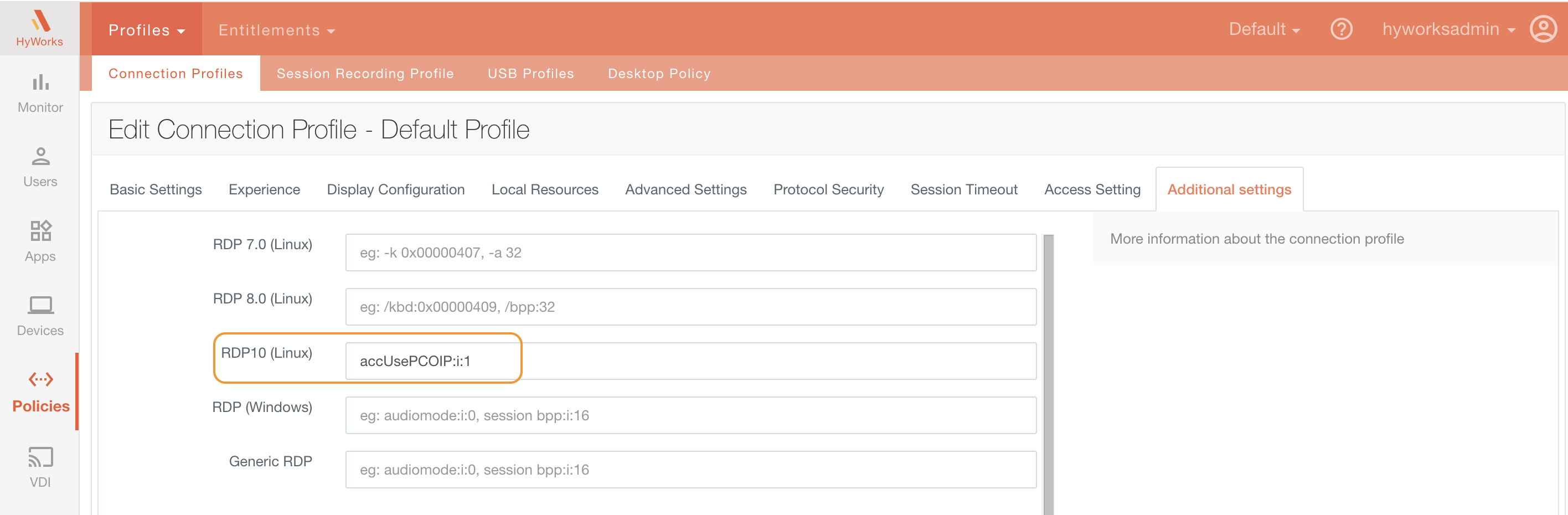
Create a connection profile on the controller with PCoIP option enabled.
-
Enable the following tag:
accUsePCOIP:i:1
-
Important Note
-
Logs will be generated at the location:
/home/< username >/.edc/logs
-
The generated command lines can be found in the uilogs.log file.
-
Installing PCoIP client script code can be found in install_eclient.sh