Clipboard Control – Block / Allow
The Workspace Linux client can block clipboard operations if this feature is configured on the Gateway. Administrators have the option to set clipboard access within the client profile settings.
Now, administrators can enforce clipboard control policies for specific applications, providing greater flexibility and security. This means they have improved control over how users can copy and paste data using the clipboard.
If clipboard blocking is enabled in the client profile on the Gateway, users will be unable to transfer information via copy and paste in the client. This restriction can also be selectively applied to particular applications, ensuring that sensitive data is protected while still allowing necessary sharing when approved.
This update enhances data security and helps organizations meet compliance requirements by reducing the risk of unauthorized data transfers through the clipboard.
Clipboard Block Configuration
Steps to enable clipboard blocking:
-
Log in to the HySecure Management Console. Navigate to Policies > Client Profiles.
-
Select the Default configuration profile and click Modify.
-
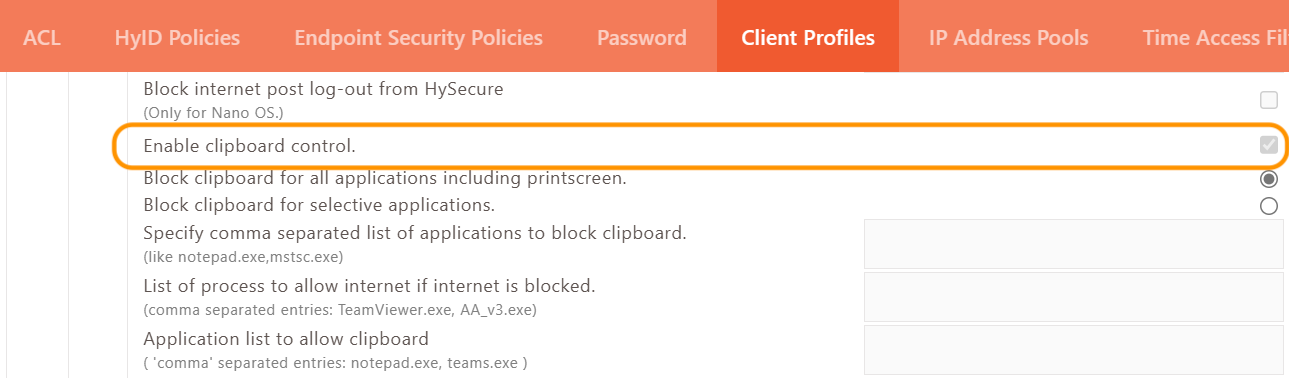
Locate and activate the Enable clipboard control option.
-
Once a user logs into the Workspace Linux client, copy-paste functionality on the Ubuntu machine will be disabled.
Clipboard control can be managed in three ways:
-
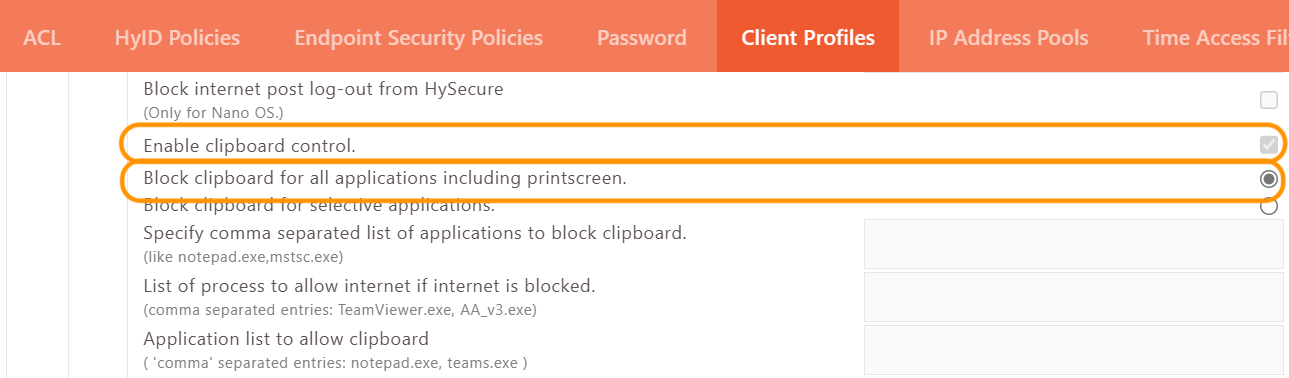
Block the Clipboard for all Applications
When the clipboard control feature is enabled in the Client Profile and the option to block clipboard operations for all applications is selected, the copy-paste functionality will be entirely disabled across the Workspace Linux client environment. Consequently, users will not be able to perform any copy or paste actions in any application after logging into the Workspace Linux client.
Important
This capability enables organizations to implement strict data loss prevention (DLP) policies, safeguarding sensitive information. By managing clipboard restrictions centrally, companies can minimize unauthorized data transfers, ensure compliance, and maintain endpoint security.
HySecure Gateway Management Console Settings
-
Block the Clipboard for Selective Applications
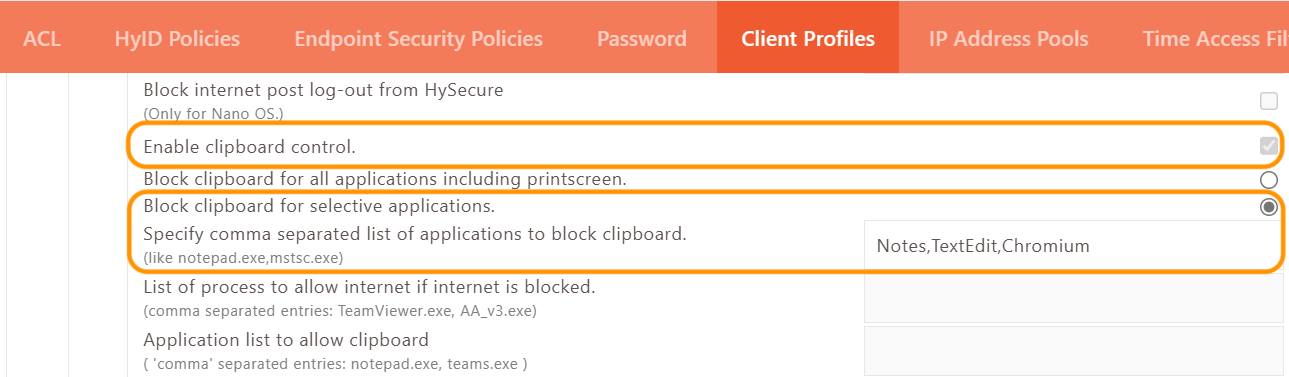
When the clipboard control is enabled in the Client Profile and clipboard blocking for specific applications is selected, copy-paste functionality will be restricted for the specified Linux applications. As a result, users will not be able to copy and paste in these specific applications upon logging into the Workspace Linux client.
Consequently, users will not be able to perform any copy or paste actions in applications such as Notes, TextEdit, and Chromium.
Note
The names of the applications are taken from the system monitor of the Ubuntu machine, and most of them do not include file extensions.
HySecure Gateway Management Console Settings
-
Allow clipboard for selective Applications
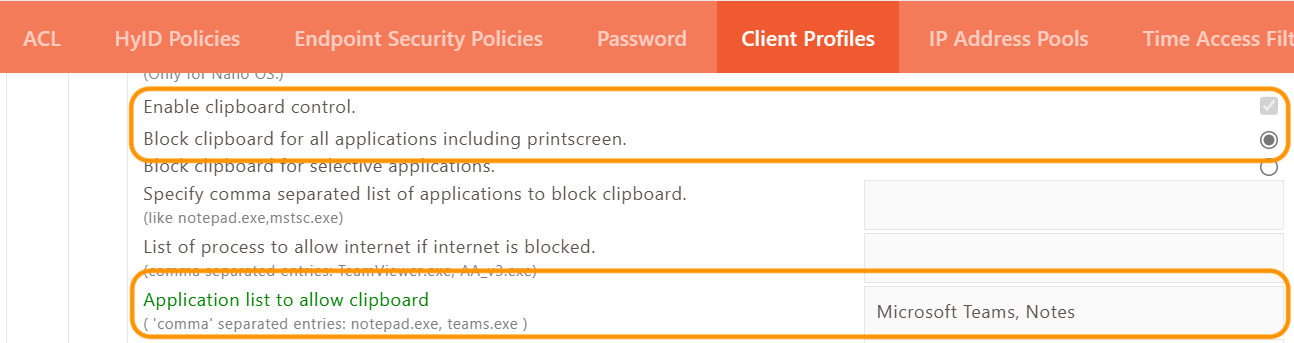
When the clipboard control is enabled in the Client Profile and the option to allow clipboard access is selected for specific applications, copy and paste functionality will be enabled for those particular Linux applications only. This means that users will be able to use copy and paste features in designated applications upon logging into the Workspace Linux client.
Consequently, users will be able to copy and paste in applications like Notes and Microsoft Teams.
Note
The names of the applications are sourced from the system monitor of the Ubuntu machine, and most names do not include file extensions.
HySecure Gateway Management Console Settings
Note
For VDI responsiveness the apps need to be exempted from DLP controls.
-
For instance, by adding Citrix Viewer to the clipboard exception list, significant improvements in latency was observed, making the desktop VDI experience noticeably more responsive and usable compared to previous performance levels.
-
This adjustment highlights how targeted clipboard exception handling can optimize overall session responsiveness while maintaining necessary security controls.