Enhancements in Accops Workspace Windows Client version 7.2.0.1078
Gateway-Based Control for Client Proxy Bypass Modification
In earlier releases, Workspace Client automatically modified system proxy settings during client login when a proxy was configured on the end-user machine. Published HySecure applications were added to the proxy bypass list, and original proxy settings were restored on client logout. This behavior was enabled by default and could not be controlled by administrators.
Enhanced Behavior
Administrators can now control proxy bypass list modification through gateway configuration:
- Default behavior: Proxy bypass list is modified on client login (maintains backward compatibility with earlier releases).
- New capability: Administrators can prevent modifications to the proxy bypass list by setting a gateway tag at the user or group level.
- Centralized management: When tag is enabled (set to True), Workspace Client will not modify the proxy bypass list during login or logout.
This enhancement provides greater flexibility and ensures compatibility with environments where proxy settings are centrally managed.
Supported Client platforms & Gateway compatibility
This enhancement is supported on the following client modes and types with HySecure Gateway versions 5.4 SP6, 7.0, and above:
| Supported Client modes and OS | 5.4 SP6 | 7.0 | 7.1 and above |
|---|---|---|---|
| Full Admin Client and Workspace OnDemand Client on Windows-10,11 OS Supported | Yes | Yes | Yes |
| Hybrid mode | No | No | No |
| HyLite mode | No | No | No |
| On-Demand Client | Yes | Yes | Yes |
Gateway Configuration
Option 1: Global Configuration (All Users and Groups)
-
Take the SSH of the HySecure Gateway Server
-
Modify the
/home/fes/public/globalsettings.jsfile on the HySecure Gateway server -
Add the tag: `DONTMODIFYSYSTEMPROXY=true
-
Applies to all users and groups globally

Option 2: Client Profile-Specific Configuration (Targeted Users/Groups)
-
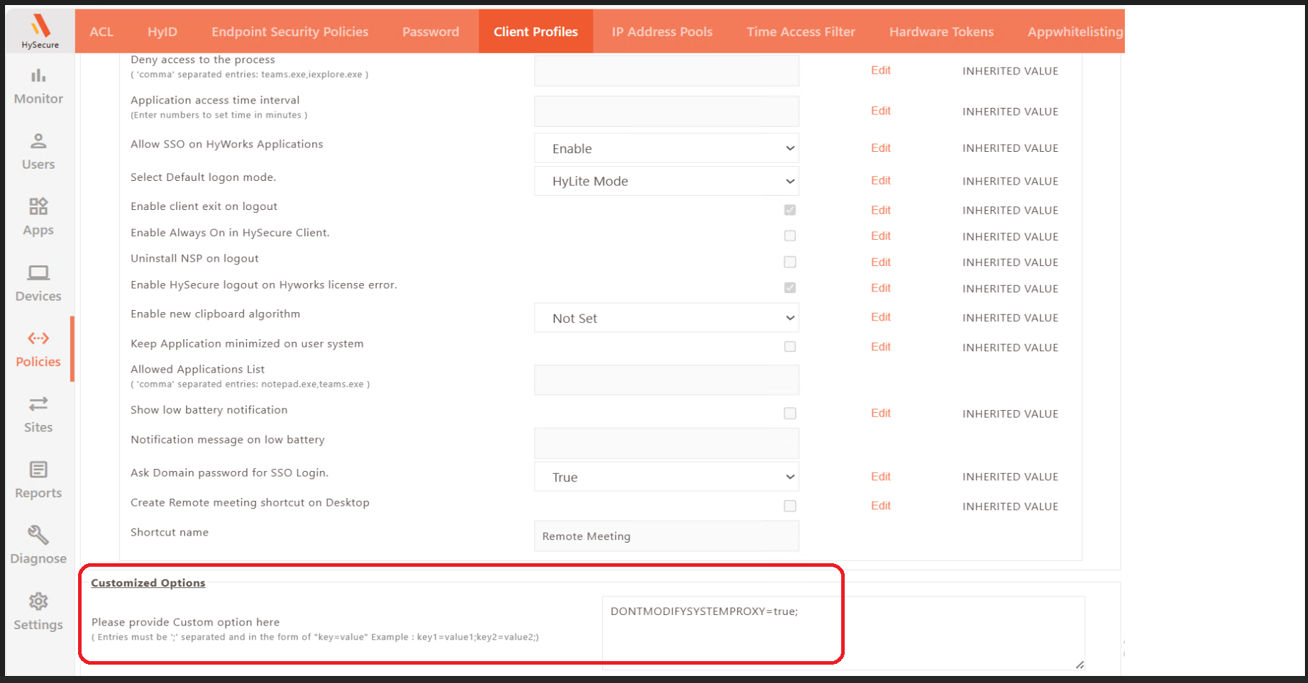
Access HySecure Management Console > Policies > Client Profiles
-
Create a new Client Profile or modify an existing profile
-
Add the tag in Customized Options:
DONTMODIFYSYSTEMPROXY=true -
Applies to specific users or groups
Configuration Tag Details:
| Tag Name | Tag Value | Behavior |
|---|---|---|
| DONTMODIFYSYSTEMPROXY | true | If set to True, Workspace Client will NOT add/change proxy settings or add the app tunnel application list to the proxy override list on the system. |
| DONTMODIFYSYSTEMPROXY | false | If set to False, Workspace Client will add/change proxy settings or add the app tunnel application list to the proxy override list on the system (default behavior). |
See the dedicated configuration guide on how to Configure Gateway-Based Control for Client Proxy Bypass Modification