Overview
ADS (Accops Directory Server) is a proxy between an Application Server and an Active Directory. It is also referred to as the LDAP proxy server or S-LDAP server. The ADS module acts as a Proxy Server and adds an authentication layer as MFA. The MFA option can be of multiple types, e.g., Mobile Token and Push Notification.
Prerequisite
Two ways of logging in to the Application UI when the Accops ADS module is configured:
-
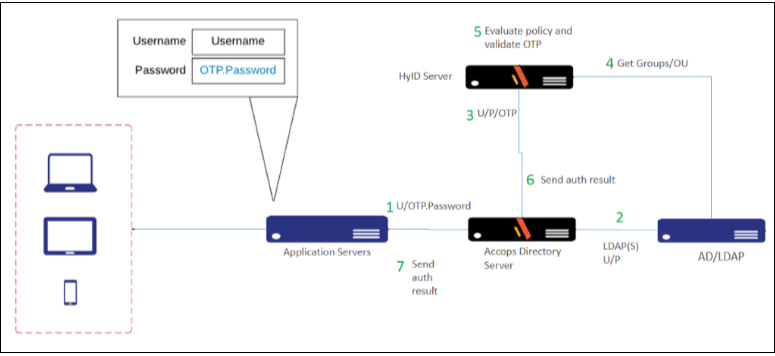
Using OTP as a Password - The user must provide a username, but instead of a password, enter the OTP. OTP is a six-digit code generated and forwarded to the user's mobile device via the HyID Application. Refer to the diagram for a detailed flow.
-
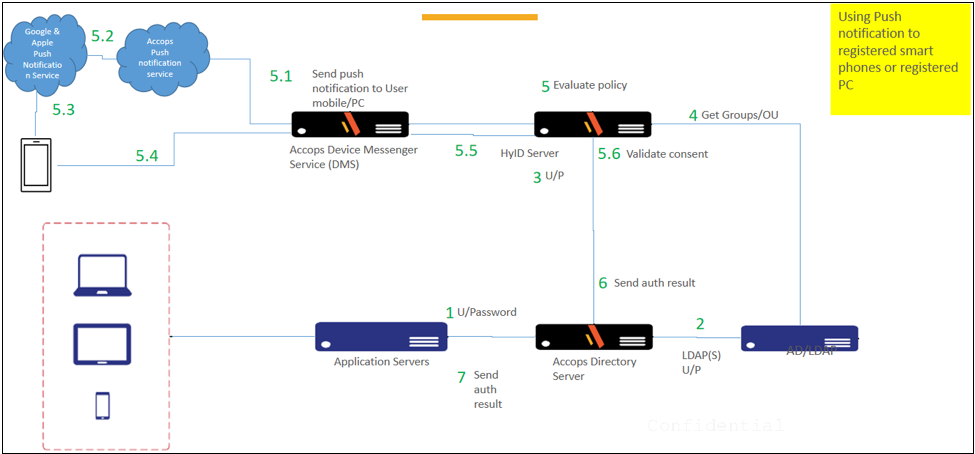
Push Notification is the second way. Here, a notification is initiated on the user’s device when the user enters the correct Username and Password. However, an OTP password is not required; only the password will be entered from the user’s side.
Note
DMS server installation and configuration will be required if you are using this option.
Let's understand the existing Application login flow, which is connected directly with the Active Directory or LDAP server and integrated with Accops ADS and MFA. In the diagram below, Application A requires MFA, and Application B requires authenticating the user directly with the Active Directory.
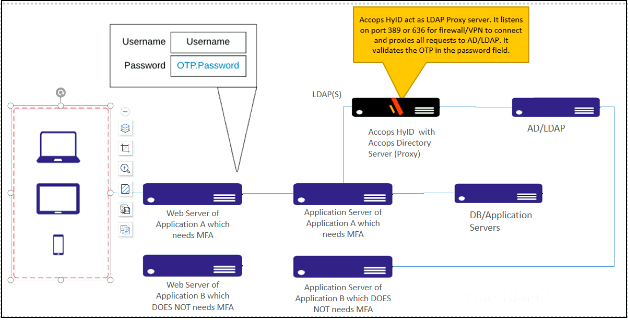
Use Case - Application A, where MFA is required
- First, the request reaches the web server, prompting the user for credentials.
- The credentials are forwarded to the application server for authentication. We have configured the Accops ADS server as the authentication server for "Application A.”
- When the credential reaches the Accops ADS server, the Accops HyID module will validate the OTP, and the username and password will be validated against Active Directory, since Accops ADS is already connected to the Active Directory/LDAP server and acting as a Proxy.
- Once the HyID receives confirmation of the username and password, the application will receive a successful login message, and the user will be logged in.
Use case - Application B, where MFA is not required
- First, the request reaches the web server, prompting the user for a username and password.
- The credentials are forwarded to the Application Server for authentication. We have configured the Active Directory/LDAP server as the authentication server for "Application B.”
- When the credential reaches Active Directory, the user will be authenticated via Active Directory with any configured MFA.
For detailed AD/LDAP configuration, click here.